


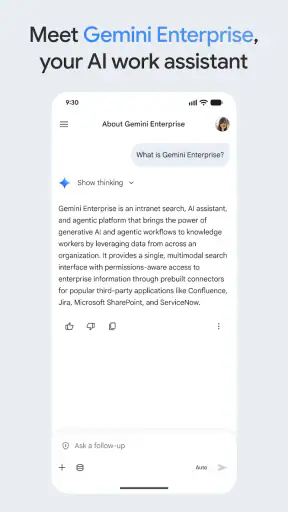
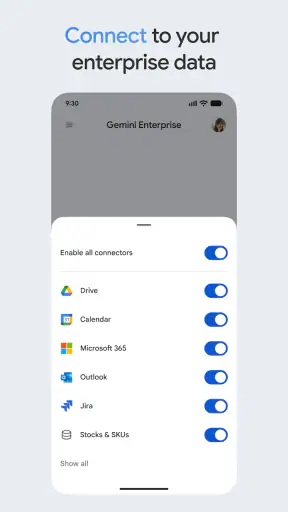
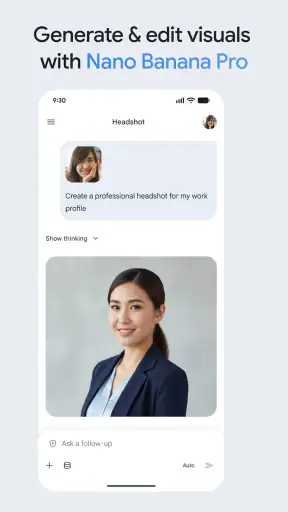
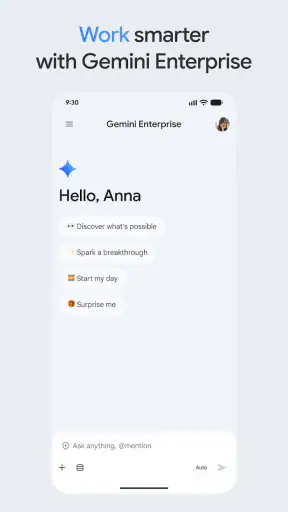
I approached Google Gemini Enterprise as a mobile productivity tool rather than as a general chatbot. Its purpose is to help people use a company’s AI agents and obtain answers from business information while away from a desk. That distinction matters: the value is not simply in asking for a clever paragraph, but in turning scattered workplace knowledge into something easier to consult during a busy day.
In my experience, the app makes the most sense for employees who already work inside an organization with relevant AI agents and connected company information. If you only want a casual writing assistant, a personal note tool, or a conventional search engine, this is probably more specialized than necessary. For the right user, though, having a work-focused AI companion on a phone can remove a surprising amount of friction from small decisions, quick checks, and preparation between meetings.
How I would build a dependable everyday workflow
The first habit I recommend is to treat the app as a starting point for investigation, not as an automatic authority. I would begin with a focused question that names the business context, the desired format, and the time period when those details matter. “Summarize the latest project status for a leadership update” is less useful than asking for the current status, unresolved risks, owners, and a short list of points suitable for a meeting.
That extra structure helps me judge the response. A good answer should make it clear what information it used and where I still need to verify something. I would not copy a generated response directly into an important customer message or management report. Instead, I would use it to locate the relevant facts, identify gaps, and create a first draft that I can check against the original business material.
A realistic example is a sales manager preparing for a morning call while travelling. Rather than opening several internal pages and searching each one separately, the manager can ask the available company agent for a concise account of the customer’s recent activity, open issues, and next steps. The useful result is not merely saved time. It is a more consistent preparation routine, because the same request can be adapted for different customers without rebuilding the process from scratch.
I also found that short follow-up questions are more practical than trying to write one enormous prompt. I might first request a summary, then ask which parts are uncertain, then ask for a version written as an agenda or a checklist. This sequence keeps the conversation understandable and makes it easier to notice when the answer has drifted away from the source material.
For recurring work, I would keep a small set of prompt patterns in a personal note. One pattern could ask for “key facts, open questions, and recommended next action.” Another could turn a long internal explanation into a briefing with separate sections for decisions, dependencies, and risks. These are not magic commands; they are repeatable habits that make the app more useful because I am giving it a stable job instead of improvising every time.
The mobile setting changes how I judge the experience. On a phone, I am usually dealing with limited attention, a small screen, and interruptions. I would therefore ask for compact answers first and request detail only when needed. A long response may be impressive, but a short, well-organized answer is usually more useful when I am standing outside a meeting room or moving between appointments.
Settings and preparation that deserve attention
Before relying on the app, I would spend time understanding which company AI agents are available to me and what kind of business information each one is intended to answer from. The phrase “your company’s AI agents” suggests that the experience depends heavily on the organization’s setup. Two employees may therefore see very different practical value even when they use the same application.
I would also check the account and workspace context before asking sensitive work questions. On a shared or personal device, it is important to know which account is active and whether the conversation is taking place in the intended work environment. A polished answer is not helpful if it was requested from the wrong context or if I accidentally mix personal and professional tasks.
The current version is 26.08.2408.969650285, and the app requires Android 11 or later. Those details are worth checking before planning a rollout to a team, particularly when employees use older phones. The application is free, but that should not be confused with every company AI capability being universally available to every person; the usefulness of the service still depends on the agents and business information made available through the organization.
Google LLC is the developer, which may reassure organizations already familiar with Google’s productivity ecosystem, but it does not remove the need for sensible internal rules. I would establish a simple policy for reviewing generated answers, handling confidential material, and deciding which outputs may be shared externally. The app can support a workflow, but it cannot replace the judgment of the employee using it.
Another practical setting is the level of response detail I expect. If I repeatedly need executive summaries, I would phrase requests around that format. If I am troubleshooting an operational issue, I would ask for assumptions and missing information to be separated from confirmed points. This is more reliable than hoping the application will infer my preferred style from a vague question.
I would also avoid judging the tool after one impressive demonstration. A workplace assistant should be tested with ordinary tasks: finding a policy explanation, comparing project updates, preparing a meeting brief, and identifying unanswered questions. The important question is whether it remains useful when the information is incomplete or written in inconsistent language, not whether it can produce a polished paragraph from a perfect prompt.
Faster patterns that make the phone experience worthwhile
The strongest mobile pattern is a three-step loop: ask for orientation, narrow the result, and turn it into an action. For example, I might ask what changed in a project update, request only the changes affecting my team, and then ask for three questions to raise in the next meeting. This approach keeps the app focused on decisions rather than turning every interaction into passive reading.
Another effective pattern is to request different views of the same information. A manager may need a brief summary, while a specialist needs dependencies and technical concerns. Instead of repeating a full search, I would ask the follow-up in the same conversation and compare the two perspectives. That is especially useful when preparing for a meeting with people who care about different parts of the same project.
I would use the app for translation between workplace formats, not just between languages. A dense update can become a decision log, an action list, or a list of unresolved questions. This is one of the more valuable uses because the underlying information may already exist; the app helps me reshape it for the next step in the workflow.
A useful shortcut in my routine would be to end every conversation with a verification pass. I would ask which statements are directly supported by the available company information, which are interpretations, and what additional detail is needed. This does not guarantee correctness, but it creates a deliberate pause before I treat a generated answer as a conclusion.
I would also keep prompts specific to the role I am performing. “Help with this project” is too broad. “Prepare a short internal briefing for a product meeting, separating completed work, blocked work, and decisions needed” gives the assistant a clearer target. The more repeatable the role and output, the easier it becomes to compare answers from one day to the next.
For teams, a shared collection of approved prompt examples could be more valuable than encouraging everyone to experiment independently. The examples should show how to request summaries, surface missing information, and format action items. They should not promise that every agent can answer every question. That distinction helps employees understand the boundaries of the system instead of treating it as a universal company search box.
The app’s audience is reflected in its reach: it has passed one million installs and carries a 4.1 average from around five thousand five hundred ratings. I read that as evidence of meaningful interest, not proof that it will fit every workplace. A productivity tool can receive positive feedback while still being a poor match for a team whose information is fragmented or whose daily work depends on systems the available agents do not cover.
Where experienced use meets real limits
The biggest limitation is dependence on the quality and scope of the company’s AI agents. If the relevant information is outdated, incomplete, or unavailable to the agent, a fluent answer may still leave out what matters. I would never assume that a confident tone means the app has a complete view of a project, customer, policy, or incident.
There is also a trade-off between speed and inspection. The application is attractive when I need a quick answer on the move, but mobile convenience can encourage me to skim. For high-impact decisions, I would switch from rapid questioning to careful source checking and involve the appropriate colleague. The app is best as an accelerator for informed work, not as a substitute for ownership.
Another limitation is that the tool may be excessive for people with simple personal productivity needs. If I only need a shopping list, a private journal, basic reminders, or offline notes, a conventional app is likely clearer and less dependent on workplace configuration. Someone looking for a broad creative assistant may also prefer a general-purpose option designed around personal use rather than company information.
Privacy and account discipline deserve equal attention. I would not paste confidential information into an unexpected account, and I would not assume that a phone is automatically a safe place for every business conversation. The right approach is to follow the organization’s rules and keep the app within the work context it was intended to serve.
Reliability should be judged by the consequences of an error. A mistaken suggestion for a low-stakes draft may be easy to correct. A wrong interpretation of a customer commitment, compliance instruction, or operational status is much more serious. I would use the app more freely for preparation and organization than for final approval, legal interpretation, or irreversible action.
The age rating is Everyone, which makes the app broadly approachable from a content perspective, but that does not mean every workplace scenario is suitable for every user. Access to company information and the responsibility attached to an answer remain practical concerns. The friendly mobile format should not make professional judgment feel optional.
Who should use it and who should skip it
I would recommend it to employees who regularly need quick access to internal knowledge, especially when their work involves meetings, project coordination, customer preparation, or repeated status checks. It is also promising for people who already know how to evaluate AI output and are willing to refine questions instead of accepting the first response.
It is less suitable for a person who expects a fully independent assistant that understands every company system automatically. The experience is shaped by the agents available in the organization, so expectations should be set around supported workflows rather than unlimited access to all business knowledge.
I would also hesitate to recommend it as the only tool for teams that need formal document control, detailed audit trails, or specialized professional analysis. In those cases, the app may still help with orientation and drafting, but the authoritative system should remain the place where records are checked and decisions are finalized.
Compared with ordinary web search, the appeal is the possibility of asking about company information in a conversational way rather than searching through public pages. Compared with a standard notes app, it can help transform existing business context into summaries and questions instead of merely storing text. Compared with a general AI assistant, its advantage is its enterprise focus, while its weakness is that the experience may feel narrow when the organization has not prepared useful agents or connected information.
That comparison explains why I would not choose it solely because it is free. The price removes a barrier to trying it, but the real investment is behavioral: learning which agent to use, writing precise requests, checking answers, and creating repeatable habits. Without those steps, it can become another app that produces attractive text without improving the work around it.
My verdict after adopting a repeatable habit
My overall view is positive, with a clear condition: Google Gemini Enterprise is most valuable when it is used as a guided work companion, not an unquestioned answer machine. Its mobile format suits quick preparation and follow-up, while its focus on company AI agents gives it a more practical workplace identity than a purely personal chatbot.
I would start with a small workflow rather than asking an entire team to use it for everything. Choose one recurring task, such as meeting preparation or project-status review, define the expected output, and add a verification step. After that routine feels dependable, expand into related formats such as action lists, decision summaries, and questions for stakeholders.
The application was released on February 25, 2026, and its current version shows that it is a relatively specific product to evaluate in the context of an organization’s setup. I would pay attention to how well the available agents match real daily work, not just how polished the conversation feels during a demonstration.
For me, the best reason to install Google Gemini Enterprise is the chance to reduce the time spent locating and reshaping internal information while away from a computer. The best reason to be cautious is that convenience can hide uncertainty. If you are comfortable checking generated answers and your company has useful agents ready for your role, this free productivity app is worth exploring. If you need a simple personal organizer or a guaranteed source of truth, I would choose a more focused alternative instead.


